
Internally-Hosted Legal AI Platforms: A Practical Approach for Modern Legal Departments
1. Introduction
Artificial intelligence is beginning to reshape how legal departments handle research, contract review, and matter management. But many legal teams face the same barriers:
- commercial AI tools are expensive
- workflows vary widely across organizations
- data must remain secure and portable
- legal teams cannot afford major process disruption
In my experience working across several corporate legal departments, no two teams operate the same way. A one-size-fits-all AI tool rarely aligns cleanly with established processes. And when the total cost of ownership includes per-seat licensing, hosting fees, and workflow redesigns, many teams discover the ROI isn’t there.
For these reasons, I built Phoenix an internally hosted legal AI platform designed specifically to support legal teams without modifying how they work, without vendor lock-in, and without sending sensitive data outside company firewalls.
Phoenix is:
- fully self-hosted
- powered by open-source models
- customizable to any legal workflow
- cost-free to operate beyond hardware
- extensible through a modern API
A demo showcasing the system is available here, along with its open-source code on github here. Below, I describe how Phoenix works and how internally-hosted AI can enhance a legal team’s productivity.
2. Human in the Loop
Phoenix is purpose-built to support, not replace, legal professionals. Every component is designed for tasks legal teams perform daily:
- researching statutes
- triaging and matter management
- reviewing and redlining contracts
Phoenix accelerates these workflows, but attorneys remain fully responsible for review, judgment, and final decisions. The emphasis is on draft acceleration, issue spotting, and workflow routing—all of which improve team throughput while keeping humans in control.
3. Commercial AI Tools in the Market
Many commercial AI solutions offer valuable functionality and may be an excellent fit for certain organizations. However:
- they often require adaptation of internal workflows
- pricing may not scale with smaller or leaner legal teams
- data security requirements may limit adoption
- customization to niche industries or internal playbooks is limited
Phoenix is not positioned as a replacement for those tools. Instead, it is an alternative for legal teams whose cost/benefit analysis or security posture makes internally-hosted AI more appropriate. With Phoenix, the department adapts nothing—the tool adapts to the department.
4. Demo Hardware & Environment
The Phoenix demo runs locally on my modest hardware:
- NVIDIA RTX 4060 Ti (8 GB)
- AMD Ryzen 2700X
- 64 GB RAM
- Ubuntu Linux
This environment supports three types of workflows:
- Statutory Research (Michigan + California)
- Automated Matter Management (email-based intake)
- Contract Analysis + Redlining
All functionality uses open-source software and models, meaning no licensing fees and no data ever leaves the company environment.
5. Phoenix Architecture
Phoenix is built around four core components:
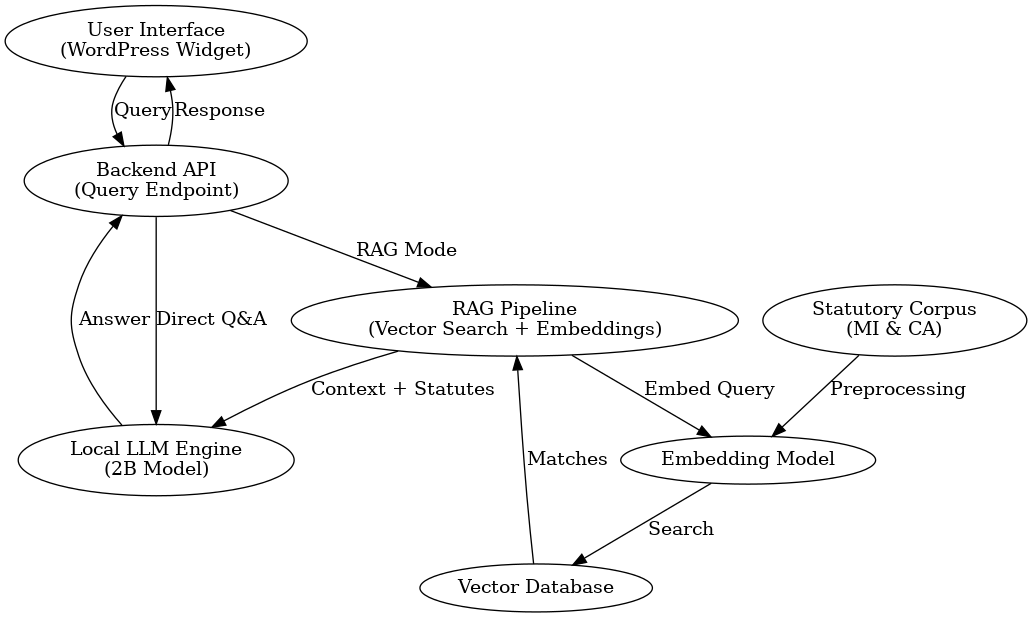
A. Front-End Layer
A lightweight WordPress/HTML/JS widget that legal teams can access from any browser.
B. FastAPI Backend
A unified interface for all Phoenix functionality—research, intake, and contracts.
C. AI + Embedding Layer
Open-source Llama-based models combined with transformer embeddings stored in ChromaDB.
D. Multi-Agent Design
Each legal workflow functions as its own agent:
- Statute Agent
- Intake Agent
- Contract Agent
All agents share the same LLM infrastructure but maintain separate logic, making customization easy and scalable.
6. Statutory Research (Michigan & California)
The demo includes multi-state statutory research, with the ability to expand to any jurisdiction.
Jurisdiction Personas
Each state uses a tailored persona that ensures:
- strict statutory interpretation
- citation-first responses
- no hallucinated laws
- clean separation of jurisdictions
- structured, readable outputs
Multi-Pass RAG Retrieval
Phoenix retrieves and filters up to 60 statute chunks, de-duplicates content, and formats context into a professional, citation-ready response.
1–3 Second Response Times
Even on modest hardware, legal teams receive fast, accurate outputs suitable for internal guidance or issue spotting.
7. Intake Engine
Phoenix includes an intake system designed to help legal teams route and triage inbound requests.
Capabilities
- automatic category classification
- priority scoring using a clear rubric
- C-suite name detection (watchlist-based)
- summarization
- suggested next steps
- team owner assignment
- optional email return
- JSON-mode parsing for consistency
Team Routing
Using a skill-weighted model, Phoenix can:
- assign matters to the most appropriate attorney
- suggest backups
- identify training opportunities
- respect playbook overrides
This transforms intake from a manual triage process into a consistent, predictable workflow.
8. Contract Engine
Phoenix’s contract module performs clause comparison, playbook enforcement, and redline generation.
A. Semantic Clause Matching
Using MiniLM embeddings, Phoenix aligns counterparty clauses with template clauses based on similarity.
B. Persona-Driven Redlines
Users may select:
- General Counsel
- Deal Maker
- Aggressive Litigator
- Custom persona
Behind the scenes, Phoenix also layers in:
- Buyer/Seller role context
- Global “North Star” rules
- Section-specific rules for Indemnification, Liability, Termination, Confidentiality
C. Delta Generation
Phoenix produces structured deltas including:
- insertions
- deletions
- replacements
- comments with legal reasoning
D. DOCX Redline Export
Phoenix supports:
- tracked changes in DOCX
- high-fidelity XML editing
- clause-by-clause analysis reports
Together, these features enable fast, consistent drafting aligned with internal playbooks.
9. Why Internally Deployed AI Matters
Phoenix demonstrates that legal departments can successfully operate their own AI infrastructure with:
- No vendor lock-in
- Zero licensing costs
- Complete data control
- Customization to internal workflows
- Flexible outputs and models
Even a small, inexpensive GPU can support:
- statutory comparison
- contract analysis and redlining
- matter management triage
- persona-driven legal reasoning
- formatted reports
- internal routing logic
Internal AI enables legal departments to adopt tools that match their existing processes, rather than forcing process changes to match a vendor’s product. Teams can embed their own rules, logic, clause libraries, and playbooks directly into the system.
Legal departments are uniquely positioned to benefit from AI because the statutory and contractual frameworks we operate within are public and structured. Unlike functions exposed to brand risk from AI-generated media or consumer-facing content, legal workflows involve research, analysis, and drafting; these are domains where AI can accelerate work without undermining integrity. With a disciplined human-in-the-loop approach, AI becomes a force multiplier rather than a risk.
Phoenix demonstrates that legal teams can deploy AI on their own terms: privately, securely, and aligned completely with internal playbooks and governance requirements. The opportunity ahead is not to replace judgment, but to eliminate friction, shorten cycle times, and enable attorneys to spend more time practicing at the top of their license. For legal departments facing increasing regulatory demands, rising workloads, and pressure to deliver more with less, internally-hosted AI represents not just an efficiency gain but a strategic advantage.